Twenty Screens, One Frame: Synchronising a Room Full of Displays With Firebase
Stand in an AirLocker studio a minute before a class starts and you notice the screens before anything else. Portrait panels, one per station, running down both walls, all holding the same frame. Then the trainer starts the class and every one of them rolls into the same movement at the same moment, and the room stops being twenty separate things and becomes one thing.
That last part is the whole product. And it is entirely a software problem.

Connected fitness sells a feeling: you’re not doing this alone, you’re doing it with the person at the next station. Everything physical in the room is built to reinforce that. The software gets one job, which is to not break the illusion. Get it right and nobody thinks about the screens at all, which is the highest compliment this kind of work ever gets.
A tenth of a second is invisible on one screen and obvious in a room
Here’s the thing about human timing. You are genuinely terrible at absolute timing. Nobody in that studio can tell you whether the countdown fired at 10:00:00.000 or at 10:00:00.400.
But you are extraordinarily good at relative timing, especially in peripheral vision. Two screens in the corner of your eye that flip a fraction of a second apart don’t read as “slightly out of sync”. They read as broken. Your eye catches the second one as a separate event. The trainer counts “three, two, one” and half the room’s timers roll over a beat behind the rest, and suddenly nobody knows which screen to trust.
So the tolerance isn’t “close enough”. It’s “no visible relative motion”, which in practice means everything lands inside the same frame. That was the bar.
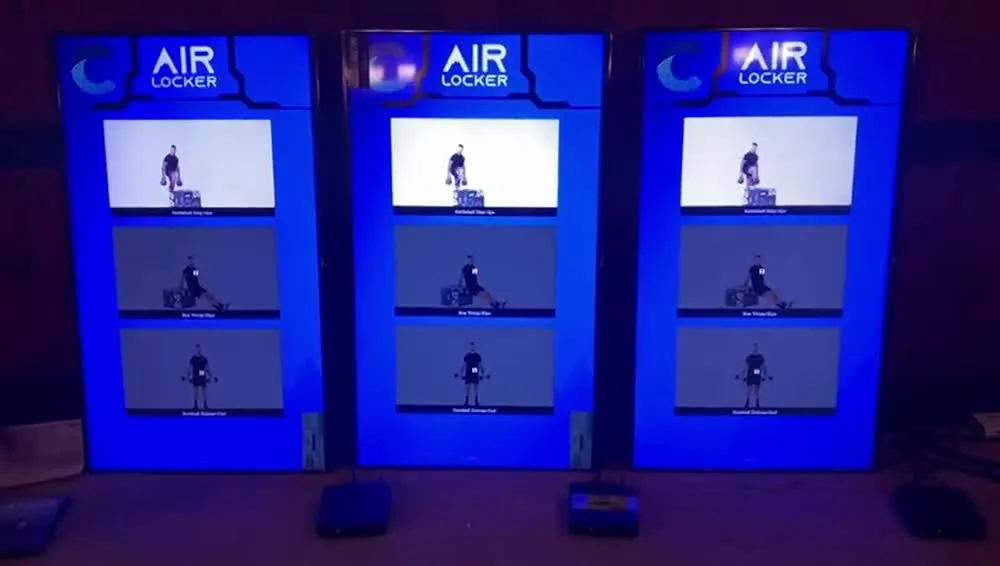
Here’s a panel up close, so you can see what’s actually being kept in step. A stack of movement clips, a countdown, a progress bar. Every one of those elements is time-driven, and every one of them has to agree with the identical element on every other screen in the room.
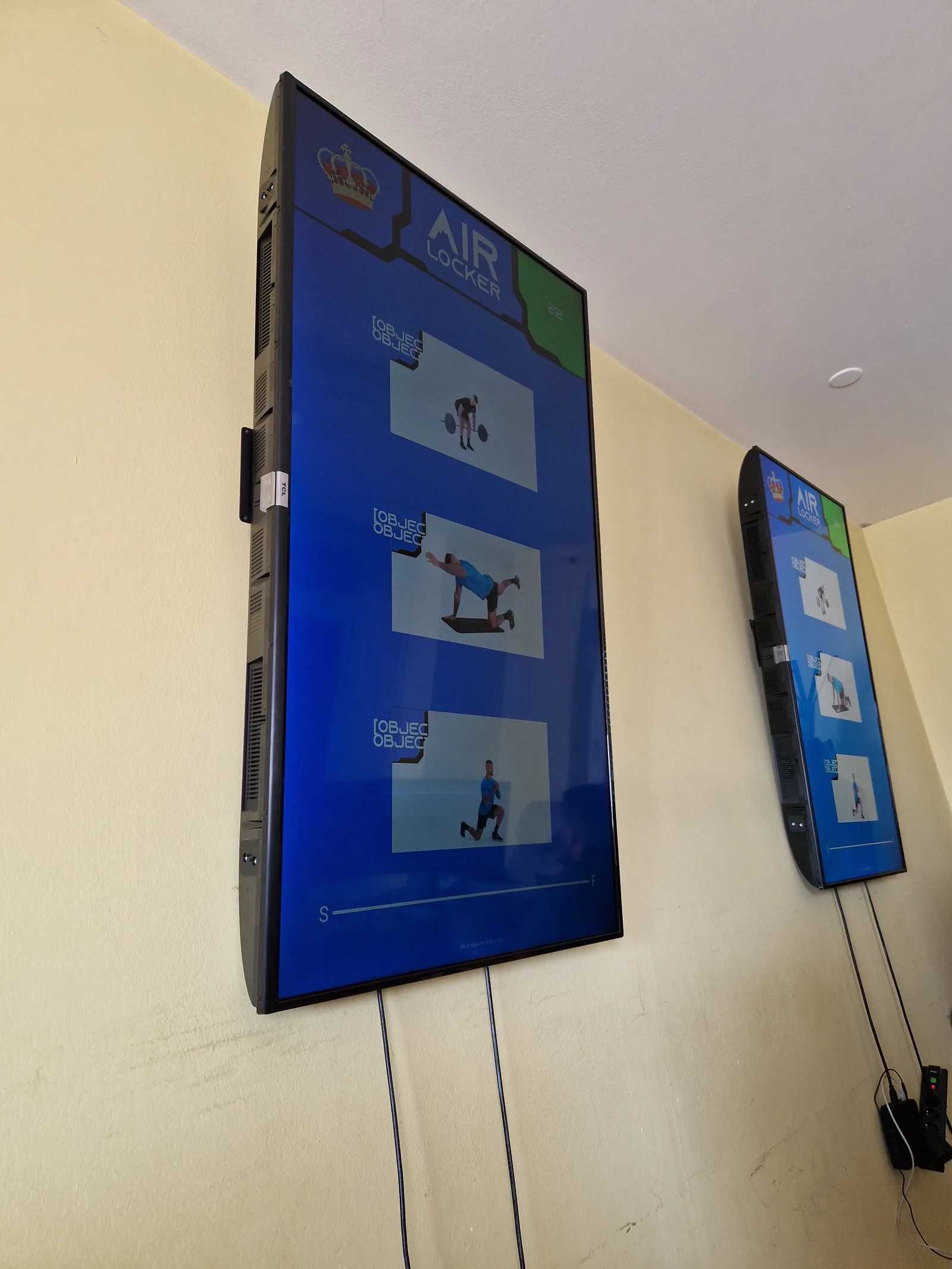
Which looks like this when it’s working:
That clip is the entire thesis of this post. Nothing in it is coordinated by messaging. Each screen worked it out alone and they happen to agree.
Where this came from
The system is built on Jaspero JMS, our own open-source CMS. That’s the platform underneath: content modelling, auth, the admin side, all of it already existed and had nothing to do with gyms. AirLocker started in 2021, and the first piece of work that was properly this product rather than the platform was about listening for workouts and managing their playback. Everything in this post grew out of that one line of intent.
Two years of heavy building, then it goes quiet, because the thing runs. Screens on gym walls across multiple locations, doing their job, not needing us. That silence is the part I’m proudest of.
Nobody gets to trust their own clock
Every screen has a clock. That’s not the problem. The problem is that twenty screens have twenty clocks, set independently, over a gym’s wifi, on machines that have been powered on for months.
You could fight this at the OS level. Tighten NTP, lock the sync interval, hope every box in every studio behaves. I didn’t want to, partly because we don’t control those machines that tightly, and mostly because it solves the wrong problem.
We didn’t need correct time. We needed agreed time. If every screen in a room is four seconds fast, the class is perfect and nobody notices. It only breaks when they disagree with each other.
That reframing kills the other obvious design too. The instinct is to broadcast: a server or the trainer’s tablet sends “start now”, every screen receives it and starts. But that puts your network jitter at the exact moment you can least afford it. One screen’s wifi has a bad second, it starts 300ms late in front of everybody, and every subsequent transition carries the same exposure. You’ve made the room’s accuracy hostage to the worst connection in the building, and you find out live, during a class.
Send deadlines instead of events. Nobody tells a screen when to start. Each screen is told what happens and at which absolute moment, then works it out locally. Now the network only has to deliver a schedule, and it can take as long as it likes, because that happened minutes before anyone was watching. By the time the class starts, the network is irrelevant.
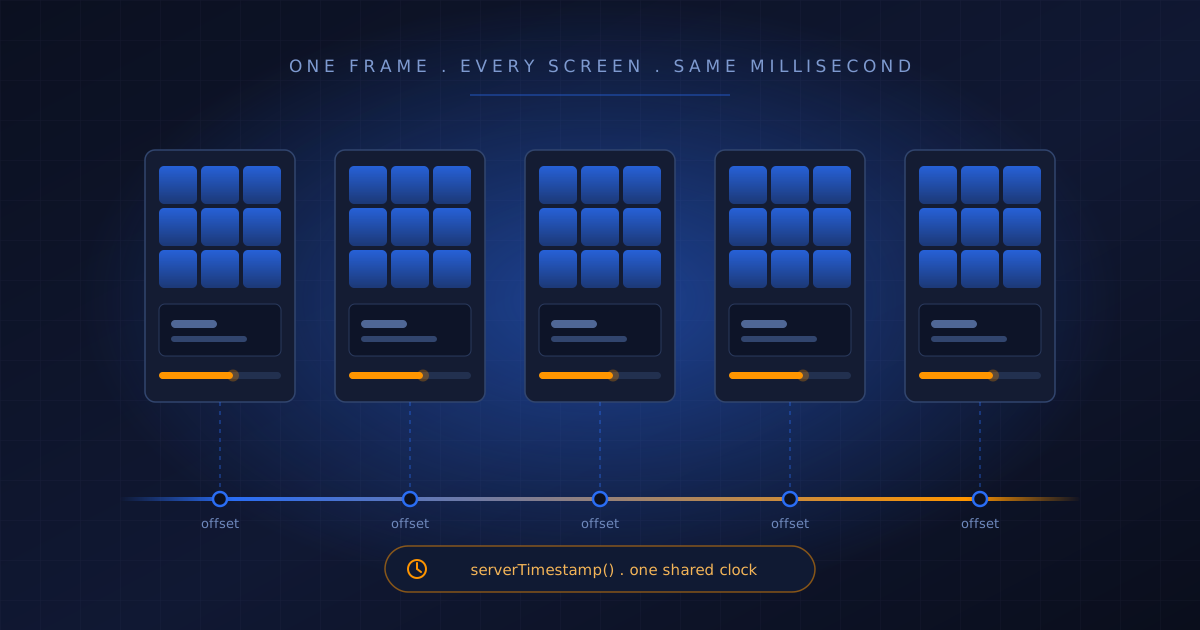
Which leaves one hard problem instead of a continuous one: getting those local clocks to agree. And we already had something every screen agreed on. Firestore was open on every panel, streaming workout state, with a server clock sitting right there. (I’ve written before about how far one Firebase project gets you. Same idea: use the thing you already have before you add a thing.)
The part that makes this genuinely hard: round trips are not symmetric
This is the bit I want to spend real time on, because it’s the intellectual heart of the whole problem and almost every naive implementation gets it wrong.
Here’s the assumption everyone starts with. You send a request, the response comes back 200ms later, so it took 100ms to get there and 100ms to get back. Split the round trip in half, done.
That is not true, and it is not nearly true.
Think about what’s actually inside those 200 milliseconds. Your packet crosses the network to the load balancer. It gets routed, authenticated, dispatched. The write reaches storage and has to be durably committed, which for a replicated database means agreement across more than one machine. A response is serialised. Then it crosses the network back to you.
Only two of those steps are network legs. The rest is server-side work sitting in the middle of your measurement. And there is no rule anywhere that says the two network legs are equal.
They frequently aren’t, for reasons that are completely mundane:
- Asymmetric routing is normal. The path your packets take outbound and the path they take back are often different sequences of hops, with different congestion and different queue depths. The internet does not promise you a symmetric path and mostly doesn’t give you one.
- Wifi is structurally lopsided. To transmit, a client has to contend for the medium and wait its turn. To receive, it just has to be listening. Add power-save states, retransmissions on a noisy 2.4GHz band shared with every phone in a gym, and the uplink and downlink behave like two different networks.
- The server’s timestamp is not taken at the midpoint. It’s taken at commit. That could be early in the window or late in it depending on load, and you have no visibility into which.
So when you compute “how far ahead is my clock”, what you actually get is the clock difference plus however long the path from commit to acknowledgement took. Those two quantities are welded together in a single number.
And here’s the part that makes it genuinely hard rather than merely annoying: you cannot separate them. Measuring commit-to-client latency would require knowing the clock difference, and knowing the clock difference requires knowing commit-to-client latency. Two unknowns, one equation. It is not deterministic and no amount of cleverness in your own code makes it deterministic.
This isn’t a limitation we invented. It’s why NTP, which has had decades of very smart people working on it, states its accuracy bound as plus or minus half the round-trip delay. NTP collects four timestamps per exchange and derives a beautiful estimator, but that estimator assumes symmetry, and NTP cannot verify symmetry, so it carries the possible asymmetry as an irreducible error term. Everything else NTP does (many samples, keeping the lowest-delay ones, filtering, disciplining the local oscillator slowly rather than jumping it) is about shrinking the round trip and averaging out noise. None of it eliminates the bias.
The protocols that genuinely beat this cheat with hardware. PTP (IEEE 1588) gets sub-microsecond accuracy by timestamping packets down at the network interface, below the OS stack, and by requiring the switches along the path to participate in the protocol. We had a browser tab, an Angular app, and a gym’s wifi. Not one of those layers can hand you a hardware timestamp.
Which reframes the entire exercise. You are not writing an algorithm that computes the offset. There is no such algorithm available to you. You are writing an estimator, and then you are correcting its residual bias empirically.
Hold that thought for two sections.
The handshake, in about ten lines
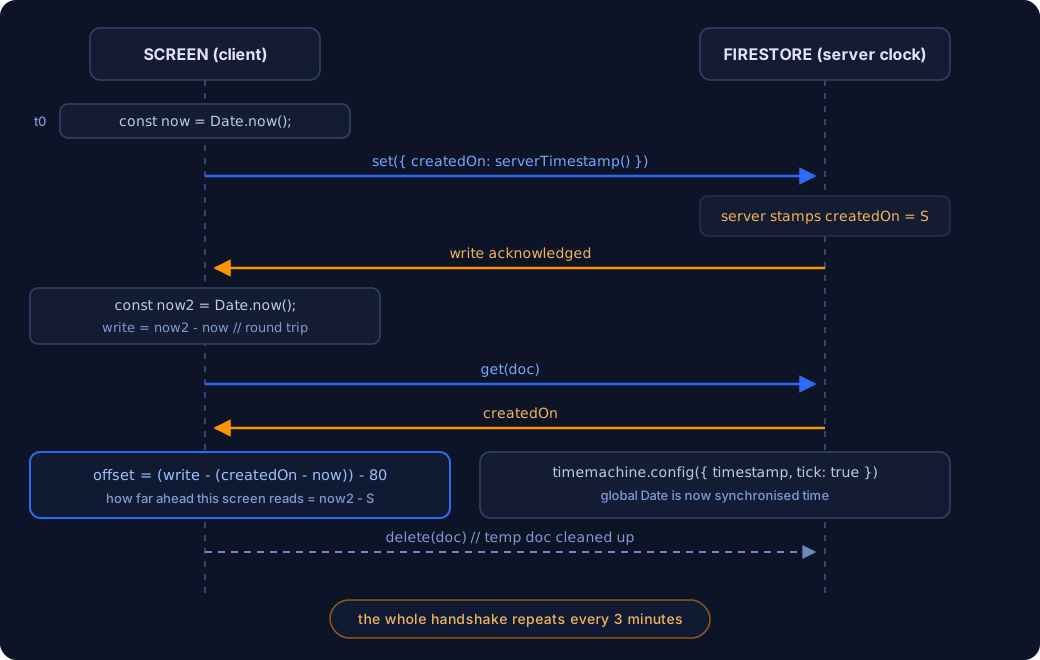
Here’s the estimator. Lightly renamed for readability, but the arithmetic is exactly what ships:
const probe = db.collection('_clock').doc(randomId());

const t0 = Date.now();
await probe.set({ createdOn: serverTimestamp() });
const t1 = Date.now();

const snap = await probe.get();
const serverStamp = snap.data().createdOn.toMillis();
const roundTrip = t1 - t0;

const offset = (roundTrip - (serverStamp - t0)) - CALIBRATION_MS;

await probe.delete();
Read it slowly and it collapses into something simple. Note the local time. Write a document whose only field is a server timestamp. Note the local time when the write returns, so roundTrip is exactly that. Then read the doc back to find out what the server thought the time was.
Do the algebra and offset reduces to t1 - serverStamp, minus a constant. In English: how far ahead this screen reads compared to the instant the server stamped the document. Every screen computes its own number against the same server, and once each subtracts its own offset they all land on the same value.
That’s NTP’s core idea, roughly, in ten lines, using a database we already had open. No extra service, no time server to run, no new thing to monitor.
Is it a good general-purpose clock? No. One sample, one round trip, no idea whether that trip was typical. But it doesn’t need to be a good clock. It needs to be the same clock across panels in one room, on one network, measuring the same server seconds apart. Under those conditions most of the error is common to all of them, so most of it cancels. Twenty screens wrong in the same direction by the same amount is, for our purposes, twenty screens that are right.
Knowing which guarantees you actually need is most of the job.
It also cleans up after itself. The probe document is written, read, then deleted, so there’s no growing pile of orphaned records.
So you stop deriving, and start calibrating
That leaves you somewhere uncomfortable, and it’s worth sitting in it for a second.
The arithmetic gets you to “clock difference, plus an unmeasurable asymmetry”. No further derivation is possible from inside a browser, because the quantity you’re missing cannot be observed separately from the quantity you’re solving for. You can be as clever as you like. The equation still has two unknowns in it.
So you have two options.
Leave the bias in, and accept screens that are consistently a little off in the same direction. Or measure the leftover error against the real system, with your actual eyes, and correct for it.
The second one is calibration. It’s what you do with any instrument whose systematic error you can observe but not derive, and there’s nothing shameful about it. Nobody thinks less of you for calibrating a scale. You put a known weight on it, you see what it reads, you adjust.
The version of this that goes wrong isn’t the calibration. It’s leaving a bare number in the timing code with nothing around it. A constant with no name and no explanation reads like an accident to whoever inherits it, even when the reasoning behind it was sound. Name it, write down what it corrects for and how you arrived at it, and the same number stops looking like a mistake and starts looking like a measurement.
The call I still defend: we replaced Date
This is the part that makes people wince.
Once you have an offset, the obvious move is a ClockService, injected everywhere, with every consumer calling clock.now(). Clean. Testable. Textbook. We did the other thing:
const offsetToUTC = moment.tz(screen.timezone).utcOffset() * 60 * 1000;

timemachine.config({
  timestamp: Date.now()
    + (new Date().getTimezoneOffset() * 60 * 1000)
    + offsetToUTC
    - offset,
  tick: true
});
timemachine monkey-patches the global Date. tick: true keeps it running forward from the corrected value instead of freezing it. After those five lines, Date.now() on this screen returns synchronised time. Everywhere. Forever.
The argument is about who you can trust to remember.
A ClockService only works if every consumer uses it. Your own code, fine, you can enforce that in review. But the progress bar inside a third-party component doesn’t know your service exists. Neither does the carousel library. Neither does an RxJS timer. Neither does whatever you install in eight months having completely forgotten this rule was ever a rule. Every one of those is a place where real time leaks back in and one screen quietly falls out of step with the rest of the room.
And the failure mode is horrible, because it’s partial. The class mostly works. One element on one screen is slightly wrong. That’s the kind of bug that survives three rounds of testing and shows up in a studio.
Patch the global and the correction becomes impossible to forget, because there is nothing to remember. Every timer, every schedule lookup, every progress bar downstream is simply correct without knowing synchronisation exists.
Global mutable state? Absolutely. Terrible idea in a general-purpose app? Also yes. But this is a single-purpose appliance whose whole job is to agree with the screen next to it, and I’d make the same call tomorrow.
The cost is debugging. When the clock is a lie you configured on purpose, every timing bug has one extra suspect, and the usual instinct of “just log the timestamp” now tells you what the app believes rather than what’s true. There’s a line immediately afterwards stashing a reference to the Date object, which tells you somebody wanted a handle on it from a console at some point. I completely understand why.
Every clock drifts, and you can prove it in ten seconds
Here’s the demo I use when someone tells me one sync at startup should be enough.
Open time.is right now, on whatever machine you’re reading this on. It compares your system clock against atomic time and tells you exactly how far off you are. Most people are mildly surprised. Some people are very surprised.
Or do the physical version. Take two identical devices, put them side by side, start the same video file on both at the same moment. Walk away. Come back later. They will not be together. Not “might not be”. Will not be. Do it with two PCs and you’ll get the same result.
The reason is that a computer’s clock is a quartz crystal, and quartz crystals are specified in parts per million. A consumer-grade part rated at 20ppm is off by 20 microseconds per second, which works out at about 1.7 seconds a day. At 50ppm you’re over four seconds a day. That’s the spec, the behaviour you paid for.
And the drift isn’t even constant. Quartz frequency shifts with temperature, and it ages. Which matters here more than it sounds: a panel mounted high on a wall in a hot studio full of people runs warmer than the same box sitting on a desk, and it’s warmer at 6pm than at 6am. The drift rate itself moves around during the day.
Yes, the operating system runs its own time sync. But it does that on its own schedule, which on a general-purpose desktop OS can be a long time between corrections, and it corrects toward absolute time rather than toward the other screens in the room. Two machines both being individually nudged toward truth at different moments is not the same as two machines agreeing with each other continuously.
So synchronisation isn’t a boot-time task. It’s a heartbeat:
setInterval(() => {
  resync(screen.timezone);
}, 3 * 60 * 1000);
Every three minutes, forever, the whole handshake runs again. Same write, read, derive, delete, then another timemachine.config() call that quietly nudges the clock back into line. Nobody watching a class ever knows it happened.
Three minutes is aggressive for something that involves a database write. It’s also very obviously not a calculated number. It’s the kind of interval you land on after watching screens misbehave.
Timezones, because head office is in another country
There’s an offsetToUTC term in that config call, and a timezone field on every screen. Easy to read as over-engineering. It isn’t. It comes straight from a client requirement, quoted from their own upgrade deck:
“Air Locker managers are scheduling their studios from a different location and the studio workouts are starting at a different time due to time zones.”
That’s the whole reason. A manager sits in one country and schedules Tuesday’s 6am class for a studio in another. Interpret that schedule in the scheduler’s timezone and the class fires at the wrong hour, with a room full of people staring at a holding screen.
So timezone lives on the device, not on the user and not on the app. Nobody designed for that up front. A business grew across borders, classes fired at the wrong hour, and a complaint travelled back down the chain until it became a field on a database record. Interesting constraints rarely arrive as constraints. They arrive as somebody being annoyed.
There’s a nice defensive touch nearby too: if a screen’s timezone ever changes underneath it, the code doesn’t try to re-derive everything in place. It reloads the page. Which brings me to my favourite part of this codebase, but first, the reason all of this had to be flexible in the first place.
One video, or twelve, decided in a CMS
The layouts aren’t hard-coded. That was the requirement from the beginning: studios wanted to build and adjust screen layouts themselves, from the CMS, without a release. Sometimes a workout shows a single movement video filling the panel. Sometimes it shows a grid of twelve or more, playing at once.
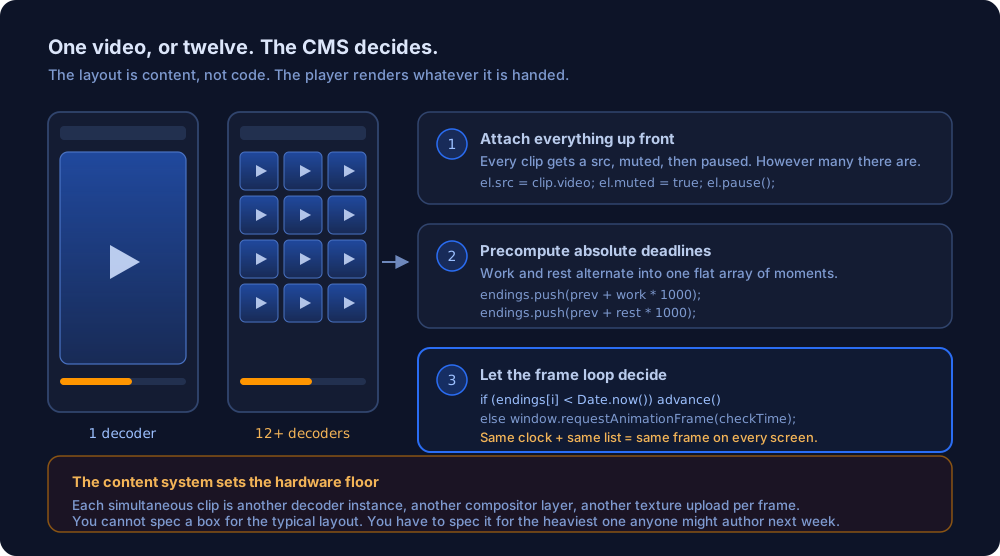
That’s a great product decision and a genuinely awkward engineering constraint, because the question “what does this screen have to render” has no fixed answer. It has whatever answer somebody authored last Tuesday.
So the player is written to not care. Every clip for the class gets attached to a <video> element up front, muted, and paused. All of them, before anything starts.
Then the end timestamps for the whole class get precomputed into a flat array, alternating work and rest:
for (let i = 0; i < clips.length; i++) {
  endings.push((endings[endings.length - 1] || Date.now()) + work * 1000);
  endings.push(endings[endings.length - 1] + rest * 1000);
}
So endings is a list of absolute moments at which something has to change. And because Date.now() is already synchronised time, every screen in the room computes the same list. That’s the payoff of the global patch: the screens never talk to each other about playback at all, they independently arrive at identical numbers.
Then a requestAnimationFrame loop watches for each deadline:
const checkTime = () => {
  if ((endings[i] || 0) < Date.now()) {
    if (i % 2 === 0) {
      carousel.next();            // work block done, advance the slide
    } else {
      videoEls[active].pause();   // rest done, hand over to the next clip
      videoEls[active + 1].play();
    }
    resolve();
    return;
  }
  window.requestAnimationFrame(checkTime);
};
This is the part I’d most want you to take away, because it’s the difference between a demo and something that survives a real class.
Ask JavaScript to do something in two seconds and it will not do it in two seconds. setTimeout(fn, 2000) means “no sooner than roughly two seconds, once the main thread is free and the browser feels like it”. You’ll get 2003 milliseconds. Or 2050. If a video is decoding or the tab throttles, considerably worse. For ordinary interface work this is completely fine and nobody notices.
Now chain those together.
A workout is a long sequence of intervals. Work, rest, work, rest, for an hour or more. If each interval is scheduled by a timer that starts when the previous one ends, every one of those small errors is inherited by everything after it. They don’t cancel out, they accumulate, and they only ever accumulate in one direction because a timer can be late but never early. Twenty milliseconds of slop per interval sounds like nothing. Across a couple of hundred intervals it’s seconds.
And now put twenty of those on separate machines in the same room.
Each one accumulates its own error, at its own rate, depending on what that particular box happened to be doing at the time. They don’t drift together, which would at least be survivable. They wander apart independently. Ten minutes in you have a room full of screens that were started at the same instant and now disagree, and no single one of them is obviously the broken one.
That’s why the deadlines are absolute and computed once. Every screen works out the entire timeline up front, in synchronised time, and then just watches the clock. A late frame doesn’t push the schedule back. It means the next check finds the deadline already passed and fires immediately. The error stays where it happened instead of being handed down to every interval that follows.
rAF rather than a timer, for two reasons. It doesn’t schedule anything, it just asks “is it time yet” on every frame, which is exactly the polling behaviour you want against a fixed deadline. And it fires immediately before paint, so the change lands on the frame the viewer actually sees rather than at an approximate moment that then waits around for the next paint anyway. When your tolerance is “same frame”, that second part matters more than it sounds.
There’s a lovely bit of pragmatism in the pause handling. Pausing doesn’t stop the loop or recalculate anything, it just pushes every future deadline forward:
if (paused) {
  endings = endings.map(t => t + 1000);
}
Every tick while paused, the remaining schedule shifts a second into the future. Not elegant. Completely correct.
And this is where the constraint gets real, because a grid layout means every tile on that panel is live at once.
Each one is a separate decoder instance, a separate compositor layer, a separate texture upload every frame. One video is trivially cheap on anything. Twelve is a different class of machine entirely. And the number isn’t yours to choose.
When in doubt, reload the screen
There are eight separate window.top.location.reload() call sites in the client. Plus a watchdog, running every ten seconds:
setInterval(() => {
  const state = { ...errors, ...info };
  const allFalsy = Object.keys(state).every(key => !state[key]);

  if (allFalsy) {
    window.top.location.reload();
  }
}, 10 * 1000);
It gathers the component’s error and info state, checks whether everything is empty, and reloads if it is. Because a screen with no errors and no information isn’t healthy, it’s catatonic. There’s even a reload() followed by a second one on a two second timer, which is the code equivalent of pressing the button twice because you’re not sure the first one took.
I know how that reads. But think about where this software lives.

There is nobody in front of these screens. No keyboard, no mouse, no user who notices something looks wrong and hits F5. Just a panel, high on a wall, in a room where the next class starts in eleven minutes. Most of us build for contexts where a human is the recovery mechanism, and never notice how much partial failure that quietly lets us get away with.
Every clever recovery strategy you might design shares one failure mode: it can itself get stuck. A retry loop can wedge. A state machine can end up in a state nobody anticipated. A reconnect handler can sit waiting on a socket the OS thinks is fine. A reload can’t. It throws away all accumulated state, every stale subscription, every half-dead connection, and comes back as a process that has definitively never been wrong about anything.
For an unattended appliance that isn’t a joke, it’s the most reliable primitive you have. Refusing to use it because it feels inelegant would have cost real classes.
The thing I’d change isn’t the reloads. It’s that they’re mostly silent about why.
Screens are physical objects, and the data model says so
A small thing I think about a lot. Simplified, the screen record looks roughly like this:
interface ScreenDevice {
  id: string;
  name: string;
  active: boolean;
  venue: string;      // which room
  station: number;    // which pod within that room
  timezone: string;
  orientation: 0 | 1;
  rotation: 0 | 90 | 180 | -90 | -180;
  muted?: boolean;
}
venue and station are a physical address. Which room, which pod. Members work through a circuit and the screen at each pod shows that pod’s exercises, which is why the identity of a screen is a location rather than an ID in a list:

timezone is the head-office problem from earlier. And orientation and rotation exist for the least glamorous reason imaginable: screens get mounted whichever way the wall, the bracket and the cable run allow.
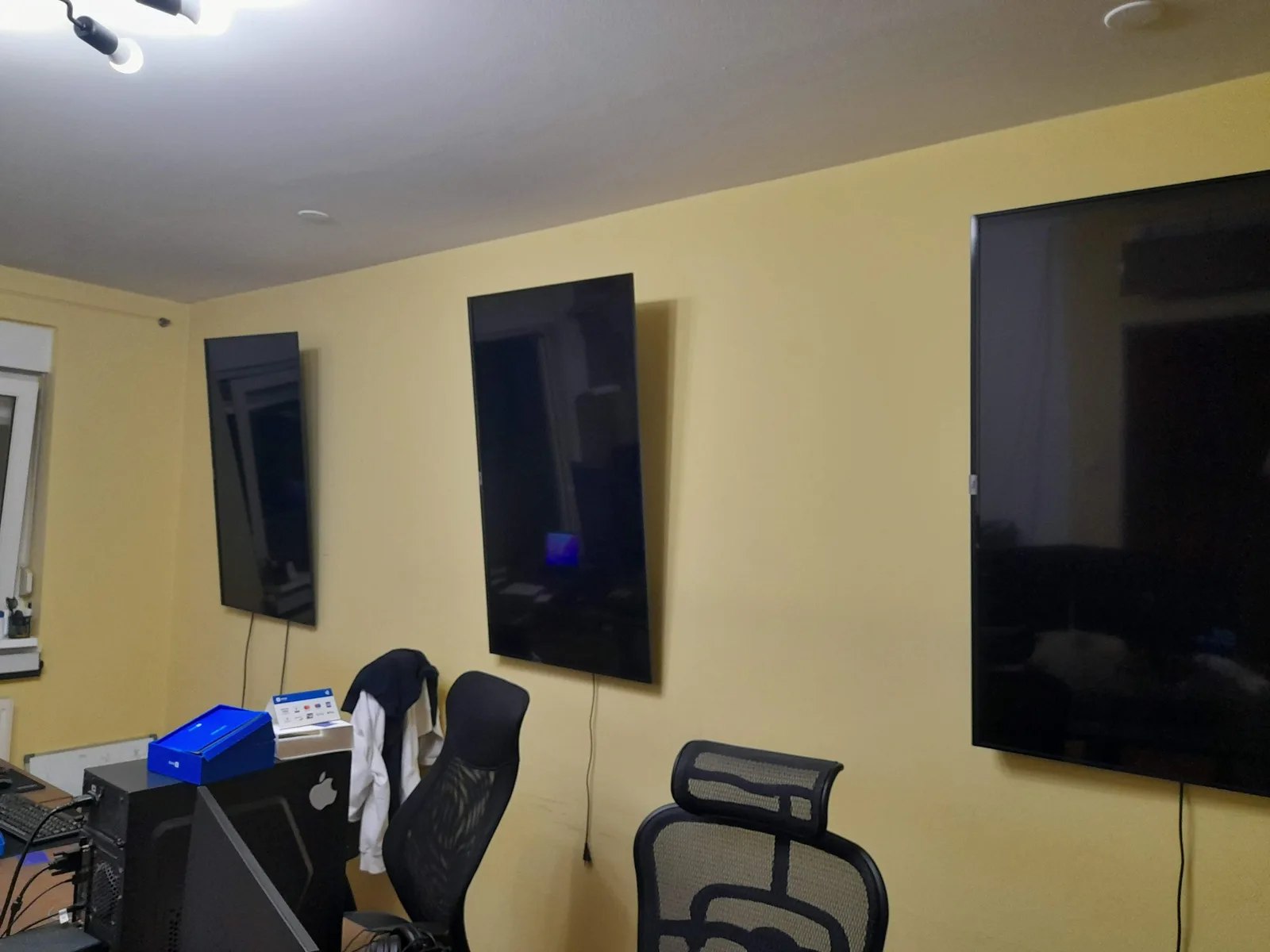
Three portrait, one landscape, sitting together on the same wall, all doing the same job. Without rotation in the data model, that wall is a bug report. With it, it’s a configuration value.
Most data models describe abstractions. This one describes objects somebody bolted to a wall with a drill, and it’s better for it.
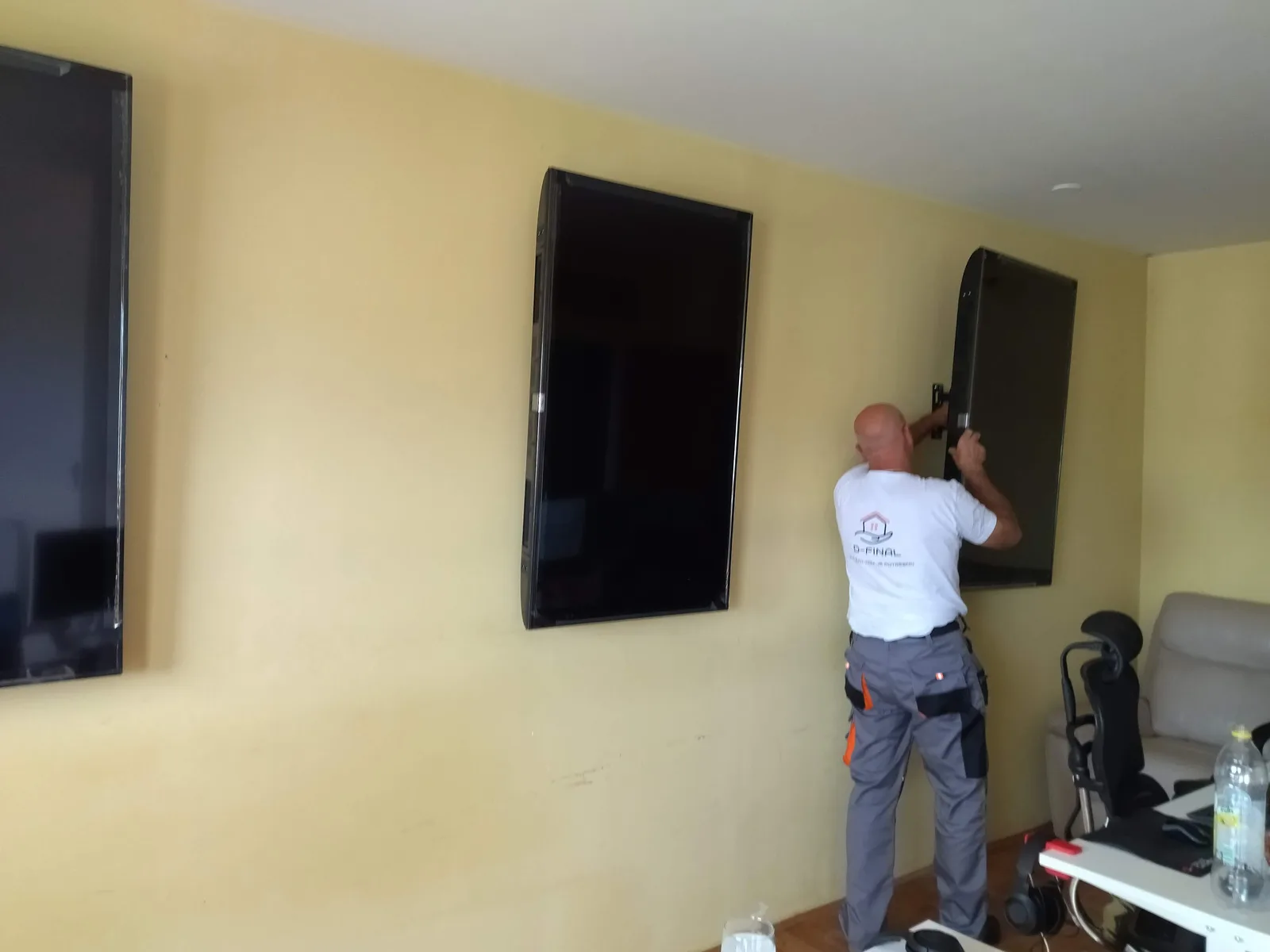 When the model matches the world, install day is “set rotation to 90 on station four” rather than “we’ll need a release”.
The content system set the hardware floor
Back to those grids.
Here’s the uncomfortable realisation, and it arrived far later than it should have. You cannot spec hardware for “a video player” when the CMS can be told to put twelve videos on one panel. The floor isn’t set by the typical layout. It’s set by the heaviest layout anyone might ever author, and that ceiling is in the hands of whoever is designing workouts next month.
Nobody wrote that requirement down anywhere, because it isn’t a requirement. It’s a consequence. A flexibility decision in the content system, made for excellent product reasons, silently set a hardware budget for every studio that would ever open.
The fleet ended up as mini PCs running Windows 10, managed with Microsoft Intune. It’s a proper little embedded-systems story of its own: an MSIX package with a Desktop Bridge wrapper, a per-device config file that carries nothing but an identifier, mixed-brand panels because you buy what’s available when a studio opens, and my favourite artefact in the whole project, a tiny Express server on port 3000 that accepts an SSID and a password so an installer can join a screen to the gym’s wifi without ever plugging in a keyboard.
app.post('/connect', (req, res) => {
  wifi.connect({ ssid: req.body.ssid, password: req.body.pass }, () => { ... });
});
Somebody with a phone, standing on a ladder, in a gym that isn’t open yet. That’s the actual user of that endpoint.
That’s a whole second post and I’ll write it. The short version is the bit worth carrying: a flexibility decision in a content system became a procurement decision for physical hardware. Software choices become hardware choices whether you intend them to or not.
What I’d do differently now
Genuinely, not performatively.
Take more than one sample. The handshake does a single round trip and then applies a correction. NTP does several and keeps the fastest, because minimum round-trip delay is your best proxy for a path with no queuing sitting in it. Three probes, take the minimum, and most of what the constant is compensating for goes away on its own. It doesn’t fix asymmetry, nothing fixes asymmetry, but it stops you calibrating against a noisy sample.
Name every calibration constant, and write down what it corrects for. A bare number in timing code reads like an accident to whoever inherits it, even when the reasoning was sound. The calibration was fine. The silence around it wasn’t.
Report the offset. Every screen computes a value that says exactly how far out of step it is, and then throws it away. Writing that back on every re-sync would have cost almost nothing and given us a live drift dashboard for the entire estate. It would also mean I could answer the drift question in this post with data rather than a placeholder. We never measured it, we just fixed it.
Get it out of the component. The sync logic lives inline in a screen component well over a thousand lines long, duplicated between the initial sync and the re-sync. It’s a twenty line module with a test, and the only reason it isn’t one is that it worked first time. Nothing forces you to revisit code that works, which is exactly why you have to force yourself.
Log why you reloaded. Keep all eight of them. Just have each one write a reason before it goes, so the recovery mechanism doubles as a bug report instead of erasing the evidence.
Stop using the database as scratch space. The handshake writes, reads and deletes a document every three minutes, on every screen, forever. It works and the cost is negligible, but reading the Date header off any HTTPS response gets you a server clock reference for one request and no writes at all. Firestore was the right call at the time because it was already open and already authenticated. I’d think harder about it today.
Keep the global Date patch. Still right. The only thing on this list I wouldn’t touch.
The takeaway
The interesting problems in real-time systems are almost never the real-time part. Sockets are easy now. Firestore streams updates to a room full of screens without you thinking about it at all.
The hard parts were deciding what “the same time” even means when there is no single clock, accepting that the quantity you need genuinely cannot be derived and has to be calibrated instead, choosing to fix it in one place rather than a hundred, understanding that unattended machines need a recovery strategy that can’t itself get stuck, and realising far too late that a flexibility decision in a CMS had already chosen our hardware.
None of that is exotic. It’s mostly being willing to make an opinionated call, write down why, and live with it. Those screens have been doing their job with barely a commit for years now, which is the only review that counts.

And this is what all of it is actually for. Not the offset arithmetic. A room of people who finished the same thing at the same time.
If you’re building something where a lot of devices need to agree with each other, and you’d rather not discover on install day what that costs, come and say hello. Happy to talk it through even if it goes nowhere.
Want to discuss architecture?
We help funded startups make the right technical decisions from day one.