We Run 3 Apps From 1 Firebase Project for $0/month. Here's the Architecture.

Open the billing page for this project and there is a number on it.
€0.00.
Underneath that number are three production applications. A public marketing site with a blog. A private admin panel behind authentication. A backend handling auth, data processing and lead capture. They have been serving real traffic for months.
Not zero with startup credits. Not zero for the first year. Zero because nothing in this architecture crosses a paid threshold.
That is the headline, and on its own it is not very interesting. Plenty of people can get a small site onto a free tier.
Here is the part that is interesting. Six months after I first wrote that paragraph, I deleted the entire frontend. Every component, the whole build pipeline, the framework itself. Rebuilt it from scratch in something else. Redeployed.
The number did not move. Neither did anything else in this post.
That is the real argument. Not that Firebase is cheap, but that if you draw the lines in the right places, the expensive-to-change decisions and the cheap-to-change ones stop being the same decisions.
What is actually running
Three applications, one Firebase project, sharing one Firestore database, one Auth instance, one Storage bucket and one set of Cloud Functions.
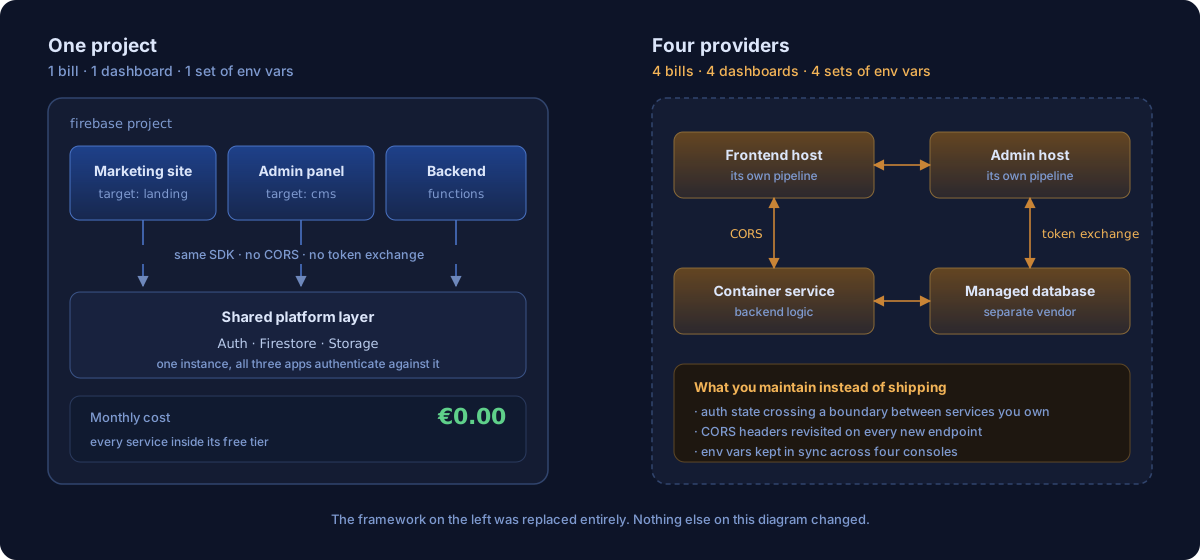
The thing on the left is one billing account, one dashboard, one set of environment variables, and no network hop between your own services. The thing on the right is what you get by following the default advice, and it is four of everything.
Firebase Hosting supports multi-site hosting, where one project serves several sites, each with its own domain and build output. That single feature is what makes the rest of this possible.
"hosting": [
  { "target": "landing", "public": "astro/dist",   "cleanUrls": true, "trailingSlash": false },
  { "target": "cms",     "public": "public/cms",   "cleanUrls": true }
]
Two build outputs, two domains, one project. The functions deploy alongside them and every app talks to the same backend without an API gateway in front of it.
Why not put the frontend on Vercel
Because your frontend and backend would then live on different providers, and everything between them becomes your problem.
Vercel is the better choice if you need server-side rendering, edge middleware, incremental static regeneration or tight Next.js integration. Those are real capabilities and if your product needs them, go and use them.
For an application that compiles to static files, none of them apply. You are paying for a deployment platform to run a server you do not have.
The bigger cost is not money, it is the seam. Put a Vercel frontend in front of a Firebase backend and you now maintain two CI pipelines, two sets of environment variables that must agree, and CORS headers you get to revisit every time you add an endpoint. Authentication crosses a provider boundary, so you are exchanging tokens between services you own.
Co-location deletes that entire category. The frontend calls callable functions through the Firebase SDK. No HTTP endpoints to configure, no gateway, no CORS, and the auth token on every request is valid because the SDK attached it. If it works locally it works in production, which is a sentence you cannot say about most multi-provider setups.
The cache strategy: immutable assets, volatile HTML
Cache your hashed assets for a year and never cache your HTML.
Most projects either ignore cache headers or apply one blanket policy, and both leave real performance on the floor. The split that works is not a compromise between the two, it is opposite treatment for two different kinds of file.
{ "source": "/_astro/**",  "headers": [{ "key": "Cache-Control", "value": "public, max-age=31536000, immutable" }] },
{ "source": "**/*.@(webp|png|jpg|svg)", "headers": [{ "key": "Cache-Control", "value": "public, max-age=2592000" }] },
{ "source": "**",          "headers": [{ "key": "Cache-Control", "value": "public, max-age=0, must-revalidate" }] }
JavaScript, CSS and fonts get a year with immutable, meaning the browser downloads them once and never asks again, not even with a conditional request. That is only safe because the build hashes every filename from its content. Change the code, change the filename, and the browser fetches the new one because it is a different URL.
HTML gets the exact opposite: max-age=0, must-revalidate. Every navigation checks. Since the HTML is what names the hashed assets, a fresh HTML file automatically points at the current bundles.
The result on a repeat visit is one small revalidation over the network and everything else served from local disk.
Deploy only what changed
Each application has its own workflow, and each workflow watches specific directories.
The default setup deploys everything on every push to main. A typo fix on the marketing site redeploys the backend. A CSS change rebuilds the admin panel. It is slow, and worse, it puts unrelated code into production during what you believed was a copy edit.
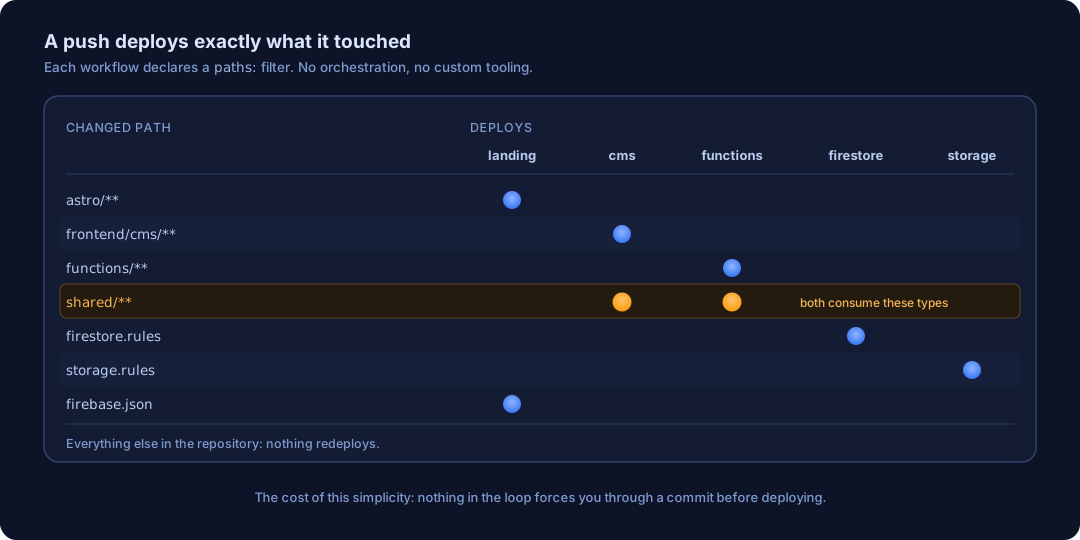
The whole mechanism is a paths filter:
on:
  push:
    branches: [master]
    paths:
      - '.github/workflows/landing.workflow.yml'
      - 'astro/**'
      - 'firebase.json'
Five workflows, each with its own filter:
| Workflow | Fires on changes to |
|---|---|
| landing | astro/**, firebase.json |
| cms | frontend/cms/**, shared/** |
| functions | functions/**, shared/** |
| firestore | firestore.rules, firestore.indexes.json |
| storage | storage.rules |
Note shared/** appearing twice. Change a type both sides depend on and both deploy, which is correct and which nobody had to write logic for.
There is no custom tooling here. It is YAML, and that is the point.
Functions, not an API
The conventional move is to build a REST API. For this workload that is an abstraction with nothing underneath it.
There is no router, no middleware stack, no Express server. Each function is one unit doing one thing: capture a lead, manage a user, sync auth state. The frontend calls them through the Firebase SDK as callable functions, which handles auth headers, serialisation and error shape without you writing an axios interceptor.
For things that should happen in response to data rather than to a request, Firestore triggers fire on document changes, which keeps business logic in the backend instead of scattered across two frontends.
One deliberate choice worth stating plainly: backend functions use the Admin SDK, which bypasses security rules entirely. That is intentional. Security rules exist to constrain untrusted clients. Server code is trusted, so rules can forbid client writes to sensitive collections outright while the backend still writes to them freely.
The part that changed
Everything above has been stable since the beginning. The framework layer has not, and this is where the post has to be honest about its own history.
When I first published this, the marketing site was a React SPA built with Vite, and there was a section here explaining why that was the right call. It also carried a genuine problem: a SPA serves an empty shell as its initial HTML. Google will execute JavaScript eventually, in a lower priority rendering queue. LinkedIn, Twitter and Facebook crawlers will not execute it at all, so a shared blog post showed the homepage’s meta tags.
The fix at the time was to launch a headless browser at build time, crawl every route of your own site, wait for React to render, and write the resulting HTML to disk. It worked. It was also a machine pretending to be a visitor in order to recover the HTML the framework had chosen not to emit.
In August I replaced the whole thing with Astro, which emits static HTML because that is what it is for. The prerendering script is gone. The vendor chunk configuration is gone. Roughly a fifth of what this post used to say is gone with it.
What did not change: the multi-site hosting, the shared auth, the cache header strategy, the path-scoped workflows, the callable functions, the monorepo layout, the cost. The landing target still points at a directory of static files. Firebase never knew which framework produced them, which is exactly why the swap was survivable.
The migration was not free, and the two bugs it produced are both worth stealing.
Astro’s internal trailing slash disagreed with the server. Astro was treating every route as /path/, and that value fed both the canonical tag and the sitemap. But firebase.json sets trailingSlash: false and 301s that exact URL away. So every page was telling Google its canonical address was the one URL on the site guaranteed to redirect. The fix is one line, and it now sits in the config with the reason next to it:
// firebase.json sets trailingSlash: false and 301s the slash variant away.
trailingSlash: 'never',
The RSS generator had its own opinion. @astrojs/rss carries a separate trailingSlash option that defaults to true and ignores Astro’s setting entirely. Same bug, second source, found only because I went looking after the first one:
// @astrojs/rss defaults trailingSlash to true independently of Astro's own
trailingSlash: false,
A canonical tag pointing at a redirect is close to the worst SEO bug available, because nothing breaks. The pages render, the build passes, the tests pass, and Google quietly declines to index you.
The bill
| Service | Free tier | Our usage |
|---|---|---|
| Firebase Hosting | 10GB storage, 360MB/day transfer | well inside |
| Cloud Functions | 2M invocations/month | a few hundred |
| Firestore | 1GB storage, 50K reads/day | a few thousand reads/day |
| Cloud Storage | 5GB | minimal |
| Firebase Auth | unlimited email/password | a handful of admins |
| GitHub Actions | 2,000 min/month | ~30 min |
| Total | $0 |
This works because an agency site generates modest traffic. Thousands of monthly visitors, not millions. Hundreds of form submissions, not millions of API calls. Firebase’s free tiers are sized for exactly this shape of usage, and when you outgrow them the pricing is linear rather than a cliff.
What it costs you, which nobody mentions
Here is the failure mode, and it is a direct consequence of the thing I have been recommending.
When deployment is “push to a branch and a YAML file notices,” there is nothing in the loop that forces you through a commit. Firebase’s CLI will happily deploy your working directory. So will you, at 11pm, to get a fix out.
Do that a few times and production drifts ahead of git. I found exactly that on this project: an entire case study, the blog cover images and a set of generated assets existed only on one laptop. The site was live and correct. The repository was not. Any push would have triggered CI, rebuilt from git, and quietly deleted the work from the live site.
The second version of the same problem is silent failure. These workflows authenticate with a FIREBASE_TOKEN secret. That mechanism is deprecated, and when the token dies the build step still passes and the deploy step fails. On two sibling projects I found deploys that had been failing for ten consecutive runs while everyone assumed pushes were shipping.
Neither is an argument against the architecture. Both are arguments for two boring habits: check that what is deployed matches what is committed, and make a failed deploy tell you.
When to outgrow this
Three signals, and recognising them matters as much as the setup.
You need SSR or edge compute. Firebase Hosting serves files. It does not run your code at the edge.
Your backend gets complicated. Callable functions and triggers cover straightforward server logic. Job queues, long workflows, inter-service communication and processing pipelines want dedicated compute.
Your traffic demands it. The free tier handles thousands of daily visitors comfortably. Hundreds of thousands of daily actives is a capacity planning conversation and probably a different database.
The migration path out is incremental in every direction. Move the frontend and keep the backend. Move Firestore to managed Postgres and keep hosting. These are component swaps, not rewrites, and the reason they are component swaps is the same reason the Astro migration was survivable: the seams are in the right places.
The takeaway
The architecture took a day to set up. Five workflows, three applications, shared types, shared auth, no monthly cost.
The point is not that Firebase is the answer. The point is that infrastructure cost should be proportional to actual usage, and most early-stage products are provisioned for traffic they will not see for two years. If your marketing site gets a few thousand visitors a month and your backend handles a few hundred operations a day, you do not need Kubernetes, a managed database cluster or a container orchestration platform.
You need a CDN for static files, a database that scales to zero, somewhere to run server logic without a persistent server, and CI that deploys only what changed.
All of that exists at zero cost. The hard part was never finding it. The hard part is the discipline not to build for scale you do not have, and then drawing the seams so that when you are wrong about something, you get to replace one piece instead of all of them.
I was wrong about the frontend. It cost me one layer.
Want to discuss architecture?
We help funded startups make the right technical decisions from day one.